Gorilla Adventure
Gorilla Adventure Mods Game
Cat Life Simulator

Fireboy And Watergirl 6 Fairy Tales
Baldis Basics Classic Remastered
Mineland

Clicker Noob Millionaire

Deadshot Io

Tap Road 2

Racing Pop
Blue Mushroom Cat Run
Epic Road Idle
2048 Snakeio

Basketball Stars
Super Runcraft
Street Escape

Sprunki Phase 25

Sprunki Phase 24
Fish Dive
Sprunki Phase 21

Granny 6
Little Dino Adventure Returns
Sprunki Symphony Of Pride


How To Play Gorilla Adventure
The core mechanic of Gorilla Adventure revolves entirely around the hammer. Players control the gorilla by manipulating the hammer’s position and reach using the mouse. To climb, you must rotate and position the hammer so that it hooks onto nearby ledges, walls, or platforms. Once hooked, the hammer acts as a pivot point: the gorilla swings around the contact point, allowing it to pull itself upward.
Precision is paramount. Moving the cursor farther away extends the gorilla’s arms, enabling you to reach distant surfaces. Conversely, bringing the cursor closer shortens the hammer’s reach, granting finer control in cramped or narrow areas. The hammer can also be used to push against walls and floors, helping you reposition the gorilla or generate momentum for a powerful leap across gaps.
Momentum management is critical. Strong swings can clear large gaps, but excessive force may send the gorilla tumbling back down the city. Before attempting any difficult maneuver, you must secure the hammer on a stable surface and identify a safe landing point. Some obstacles reward speed and aggressive swinging, while others demand slow, deliberate adjustments. Maintaining balance is often more important than climbing quickly—rushing leads to falls.
Controls are straightforward: use the mouse to rotate, extend, and position the hammer. Press the C key to set a checkpoint at any time, allowing you to resume from that point after a fall. This checkpoint system is essential for tackling the game’s more demanding sections.
Gorilla Adventure Wiki
Summary
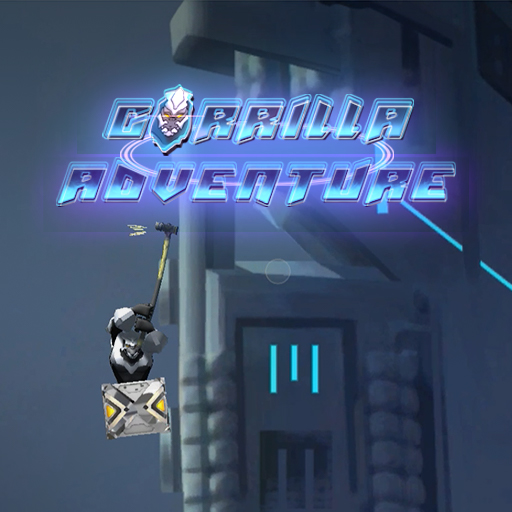
Gorilla Adventure is an action-platformer developed by GM Media that thrusts players into a dystopian, neon-lit cityscape where technology has run rampant. You assume control of a cyborg gorilla whose lower body is trapped inside a heavy metal barrel, rendering traditional walking and jumping impossible. Instead, the game introduces a uniquely physics-driven locomotion system: a giant hammer that serves as both a climbing tool and a means of propulsion. The objective is to ascend through a dark futuristic metropolis, navigating narrow ledges, floating platforms, and vertical walls, all while maintaining delicate balance and precise control. The game eschews conventional platforming tropes in favor of a methodical, patience-demanding experience that rewards careful planning and steady hands. With its atmospheric setting, minimalist controls, and a steep skill curve, Gorilla Adventure offers a refreshing challenge for genre enthusiasts seeking something beyond the typical run-and-jump formula. The game features a checkpoint system to mitigate frustration, yet each ascent remains a tense test of coordination and foresight.
Key Features
- Physics-Based Hammer Movement: The core gameplay relies on realistic physics simulation. Every swing, hook, and push reacts to the hammer’s length, angle, and momentum, creating a tactile and immersive climbing experience.
- Challenging Vertical Platforming: The entire game is built around ascending a vertical environment. There are no horizontal levels or side-scrolling segments; progress is always upward, demanding constant planning and adaptability.
- Futuristic Nighttime City Setting: The visual aesthetic is a dark, neon-drenched metropolis reminiscent of cyberpunk dystopias. The lighting, architecture, and atmospheric details reinforce the sense of isolation and technological decay.
- Useful Checkpoint System: Players can manually place checkpoints using the C key, which significantly reduces the penalty for failure. This feature encourages experimentation with different climbing strategies without punishing repeated mistakes.
- Simple Controls with a High Skill Ceiling: The mouse-only control scheme is easy to understand but extremely difficult to master. The game’s depth comes from mastering momentum, angle, and timing rather than complex button combinations.
- Rewarding Gameplay Based on Patience and Precision: Success depends on careful observation and calculated moves. The satisfaction of reaching a new height after a challenging sequence is a core draw for dedicated platformer fans.
Precautions and Tips
- Manage Momentum Carefully: Aggressive swings can send the gorilla flying, but uncontrolled momentum often leads to catastrophic falls. Always gauge the distance and angle before committing to a powerful swing. If in doubt, use short, controlled hooks to inch upward.
- Identify Safe Landing Points Before Moving: Before releasing a hook or attempting a leap, scan the area for a secure ledge or platform to catch yourself. Many falls occur because players commit to a swing without confirming a safe destination.
- Use the Checkpoint System Liberally: The C key is your best friend. Set checkpoints at stable positions after every significant climb or before attempting risky sections. This allows you to retry difficult moves without repeating long stretches of climbing.
- Patience Over Speed: Rushing is the most common cause of failure. Some segments require quick, rhythmic swings, but most demand slow, methodical adjustments. If you feel frustrated, pause, reposition, and reassess your approach.
- Master Short Hooks for Tight Spaces: In narrow corridors or areas with limited clearance, extend the hammer only slightly to maintain control. A fully extended hammer in a confined space can cause the gorilla to spin out of control or get stuck.
- Use Wall Pushes for Repositioning: When hanging from a hook, pushing the hammer against an adjacent wall can shift the gorilla’s center of mass, allowing you to reach otherwise inaccessible ledges. Experiment with different angles to find the optimal push.
- Learn from Falls: Each descent is an opportunity to understand the physics better. Note which angles caused you to lose grip or overshoot a platform, and adjust your technique accordingly.
By internalizing these tips and embracing the game’s deliberate pace, players can conquer the neon heights of Gorilla Adventure and experience one of the most unique vertical platforming challenges in recent years.
Gorilla Adventure Frequently Asked Questions
Q: What is Gorilla Adventure?
A: Gorilla Adventure is an action-platformer developed by GM Media where you control a cyborg gorilla climbing a dark futuristic city using a giant hammer.
Q: Who developed Gorilla Adventure?
A: GM Media.
Q: How does the gorilla move in the game?
A: The gorilla cannot walk or jump normally because its lower body is trapped in a metal barrel. It must use a giant hammer to climb buildings, cross narrow ledges, and overcome floating platforms.
Q: How do you climb using the hammer?
A: Move the mouse to rotate and position the hammer. Hook it onto nearby ledges, walls, or platforms, then swing around the contact point to pull the gorilla upward.
Q: How do you extend or shorten the hammer’s reach?
A: Move the cursor farther away to extend the gorilla’s arms and reach distant surfaces. Bring it closer to shorten the hammer’s reach for better control in narrow areas.
Q: Can the hammer push against surfaces?
A: Yes, the hammer can push against walls and floors to help reposition the gorilla or generate momentum for a powerful leap.
Q: How do you control momentum while climbing?
A: Strong swings can clear large gaps, but excessive force may cause falls. Before a difficult move, secure the hammer and identify a safe landing point. Some obstacles reward speed, while others require slow, careful adjustments.
Q: What are the controls for Gorilla Adventure?
A: Move the mouse to rotate, extend, and position the hammer. Press the C key to set a checkpoint.
Q: How do you set a checkpoint?
A: Press the C key to set a checkpoint at your current position.
Q: What is the objective of Gorilla Adventure?
A: The goal is to climb through a dystopian city, using the hammer to overcome obstacles, and lead the cyborg gorilla to the top.
Q: What is the setting of the game?
A: The game is set in a dark futuristic city dominated by technology, with a neon-lit, nighttime dystopian atmosphere.
Q: What are the game’s highlights?
A: Highlights include physics-based hammer movement, challenging vertical platforming, a futuristic nighttime city setting, a useful checkpoint system, simple controls with a high skill ceiling, and rewarding gameplay based on patience and precision.
Q: How do you report a bug in Gorilla Adventure?
A: Click the “Report a bug” button, select the issue you found (e.g., game not loading, not working, lost progress, etc.), and send the report.
Q: How do you share Gorilla Adventure with friends?
A: Click the “Share” button and copy the link provided.
Q: How do you play Gorilla Adventure in fullscreen?
A: Click the “Full Screen” button to enter fullscreen mode.